Quick verdict
Buy the August Wi-Fi Smart Lock (4th Gen) — it fits over the inside of your existing deadbolt, so the landlord’s key keeps working and nothing on the door changes. The SwitchBot Lock Pro does the same job for less if you can skip built-in Wi-Fi. Only consider the budget Wyze Lock Bolt if your landlord approves a full deadbolt swap in writing.
Our verdict
- Best overall
- August Wi-Fi Smart Lock (4th Gen) — ~$150–230 (check current)Check price on Amazon
- Best no-Wi-Fi-needed value
- SwitchBot Lock Pro — ~$90–120 (check current)Check price on Amazon
- Budget pick (needs landlord OK)
- Wyze Lock Bolt — ~$50–80 (check current)Check price on Amazon
The locks to compare
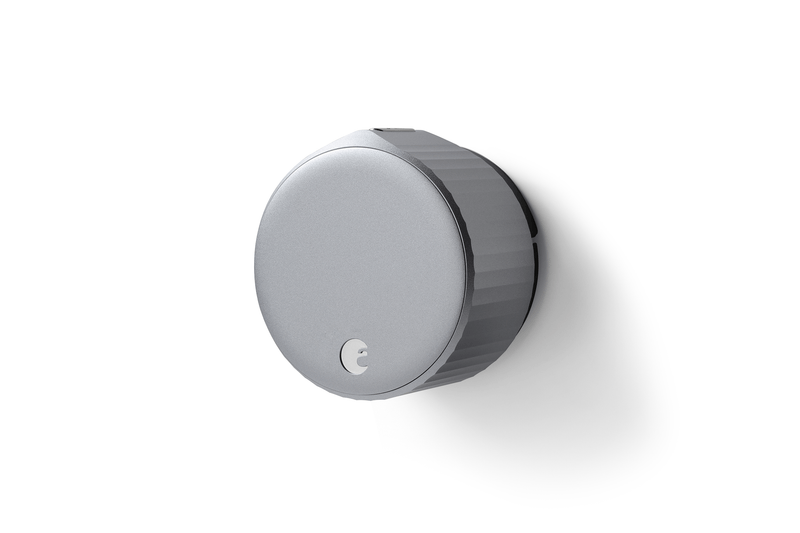
August Wi-Fi Smart Lock (4th Gen)
Retrofits the inside of your deadbolt — the landlord’s key still works.
- Fits over most single-cylinder deadbolts; outside unchanged
- Built-in Wi-Fi, no bridge needed
- Works with Alexa, Google Home, and Apple Home
- Installs in about 10 minutes with a screwdriver
~$150–230 (check current)
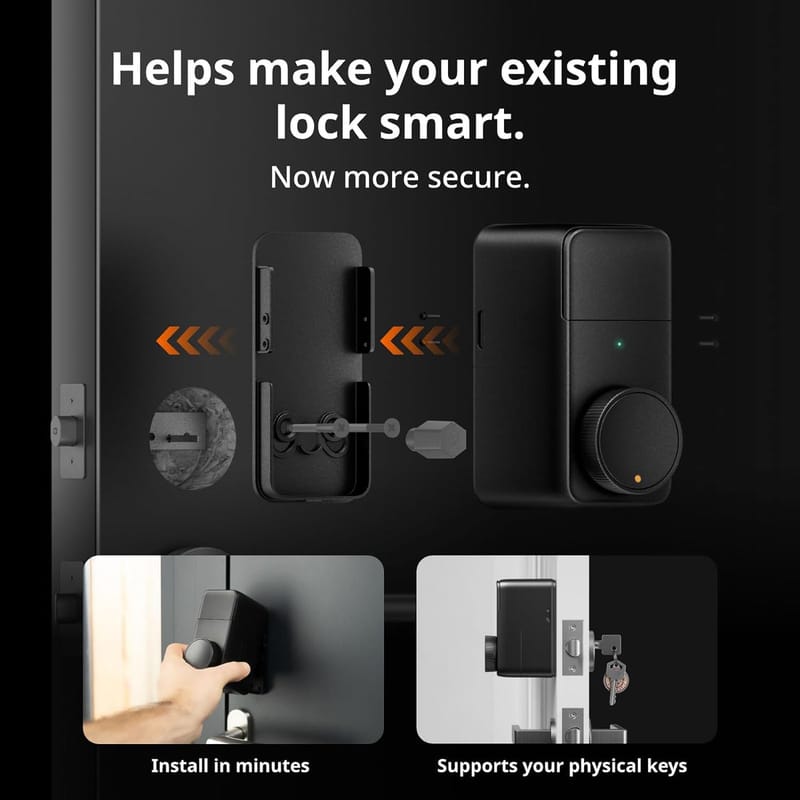
SwitchBot Lock Pro
Mounts over the thumb-turn with no drilling; original lock and keys stay.
- Retrofit install, no drilling or lock swap
- Quick Key one-touch locking; auto-lock
- 4 AA batteries, 6–9 month life
- Optional hub adds Matter, Alexa, Google, Siri
~$90–120 (check current)
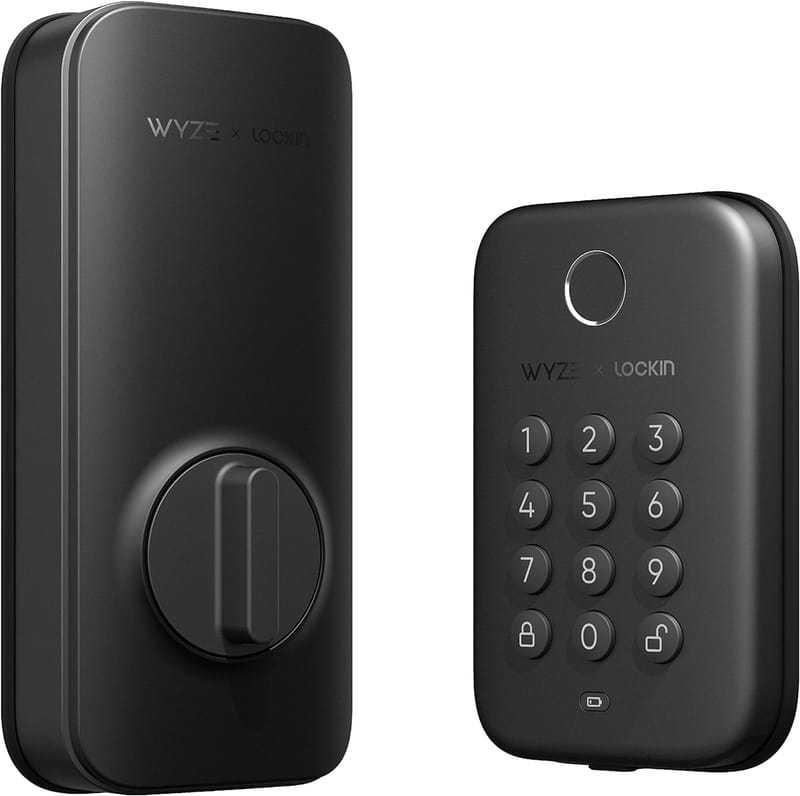
Wyze Lock Bolt
Cheap fingerprint entry, but it replaces the deadbolt — get landlord approval first.
- Fingerprint reader (up to 50 prints) + backlit keypad
- Replaces the existing deadbolt in about 20 minutes
- Bluetooth only — no remote access
- 4 AA batteries, up to 1-year life; IPX5 rated
~$50–80 (check current)
Check the lease before the checkout page
Most leases have a clause about locks: you can’t change them, or you can’t change them without giving the landlord a key. Retrofit locks like the August and SwitchBot are built for exactly this constraint — they attach to the interior thumb-turn, the exterior of the door is untouched, and every existing key (including the landlord’s and the building master) works exactly as before. A full replacement like the Wyze Lock Bolt swaps the deadbolt itself, which is a lock change under any lease — treat it like our thermostat permission checklist: written approval or skip it.
Which smart lock fits your rental situation
| Situation | Best next step | Why it fits | Check first |
|---|---|---|---|
| Standard single-cylinder deadbolt | August retrofit on the interior side | Keys and exterior hardware stay unchanged | Deadbolt type — it must be single-cylinder, not a mortise or jimmy-proof lock |
| Same, but on a budget | SwitchBot Lock Pro | No-drill retrofit; remote access is an optional hub away | Thumb-turn shape against SwitchBot’s compatibility guide |
| Landlord approves a deadbolt swap | Wyze Lock Bolt | Fingerprint and codes at the lowest price | Written approval; keep the original deadbolt in a labeled box |
| Roommates, dog walkers, cleaners | Any pick plus its keypad accessory | Codes can be shared and revoked without cutting keys | Whether guests need app access or just a code |
| Building with keyed common doors | Smart lock on your unit door only | Common-area and building-entry locks are never yours to modify | Your unit door is the only door you touch |
What each pick trades away
The August costs the most because Wi-Fi is built in: remote lock checks, auto-unlock as you arrive, and voice control work with no extra hardware, and battery life runs about three months. The SwitchBot Lock Pro runs 6–9 months on AA batteries and locks with one touch of its Quick Key button, but out of the box it’s Bluetooth — remote access and Matter need the separately sold hub. The Wyze Lock Bolt gives you a fingerprint reader and keypad for the least money, but it’s Bluetooth-only forever (no remote access), and because it replaces the deadbolt, it’s the only pick that requires hardware permission rather than a courtesy heads-up.
Before you install any smart lock in a rental
- Read the lease clause on locks and keys; when in doubt, ask in writing.
- Confirm your deadbolt type matches the lock’s compatibility guide.
- Tell the landlord even for retrofit locks — surprises at inspections go badly.
- Keep every original part in a labeled box for move-out.
- Set a low-battery alert in the app the day you install.
How we chose
We compared manufacturer installation guides and spec sheets for retrofit compatibility, battery life, and access options, prioritizing locks that leave the existing deadbolt and keys untouched. We research specs and documentation; we don’t bench-test units.
Sources checked
- August Wi-Fi Smart Lock official page
- August installation guide
- SwitchBot Lock Pro official page
- SwitchBot Lock Pro compatibility guide
- Wyze Lock Bolt official page
FAQ
Can I put a smart lock on my apartment door without asking?
Retrofit locks that keep the existing deadbolt and keys working are usually fine under lock-change clauses, but leases vary — a written heads-up costs nothing and protects your deposit. A deadbolt replacement always needs written approval.
Will the landlord’s key still work?
With the August and SwitchBot retrofits, yes — the exterior keyway is untouched, so every existing key works. With the Wyze Lock Bolt the original keyway is gone, which is exactly why it needs permission.
What happens when I move out?
Retrofit locks unscrew or unmount in minutes and the door is as you found it. For a deadbolt swap, reinstall the original hardware you kept in the box.
Do these locks work if the Wi-Fi goes down?
Yes — all three lock and unlock at the door (key, fingerprint, code, or thumb-turn) regardless of connectivity. You only lose remote features until the connection returns.